

Are 3D-Printed Keychains Durable for Daily Use?
Table of Contents
- Are 3D-Printed Keychains Durable for Daily Use?
- Best Filament for 3D-Printed Keychains
- How to Make a 3D-Printed Keychain Stronger
- 3D-Printed Keychain Lifespan: What to Expect
- Pros and Cons of 3D-Printed Keychains for Daily Carry
- Real-World Durability: What Happens Under Daily Mechanical Stress
- Frequently Asked Questions
Last Updated: October 18, 2026
Are 3D-Printed Keychains Durable for Daily Use?
3D-printed keychains durable enough for daily use depends heavily on material choice, design, and print settings.
A well-designed keychain with the right material can handle the mechanical stress of keys jingling in a pocket, being clipped to a backpack, or bouncing around a bag.
This guide covers the material options, design strategies, print settings, and realistic expectations that make 3D-printed keychains survive daily use.
Best Filament for 3D-Printed Keychains
The material you print with makes the biggest difference in how long your keychain lasts. Not all filaments handle mechanical stress equally.
PLA: Affordable but Limited
PLA is cheap, easy to print, and comes in endless colours, but PLA is brittle. It snaps under repeated bending or impact, so any keychain that flexes or takes drops will eventually fail.
PLA works fine for decorative keychains, lightweight fidgets, short-term gifts, and designs with no mechanical stress. It doesn't work for heavy key sets, hard backpack clipping, drops, or repeated flexing.
The Wiggle Gorilla Keychain from our shop uses durable PLA filament and is designed with flexible joints for fidget appeal. It's built to handle gentle wiggles and movement, making it an entertaining accessory that lasts with normal care.

PETG and ABS: Stronger Alternatives
PETG is the sweet spot for durable keychains: tougher than PLA, better at resisting impact, and handles repeated stress without cracking.
ABS is even stronger, but it warps easily and needs an enclosed printer with good ventilation. For most people, PETG delivers the durability without the headache.
Both materials handle:
- Heavy key sets
- Regular drops and impacts
- Bending and flexing without breaking
Material Science research on polymer durability under cyclic stress
How to Make a 3D-Printed Keychain Stronger
A strong keychain starts with smart design. Material alone isn't enough. The way you attach the ring and structure the joints determines whether your keychain survives or snaps.
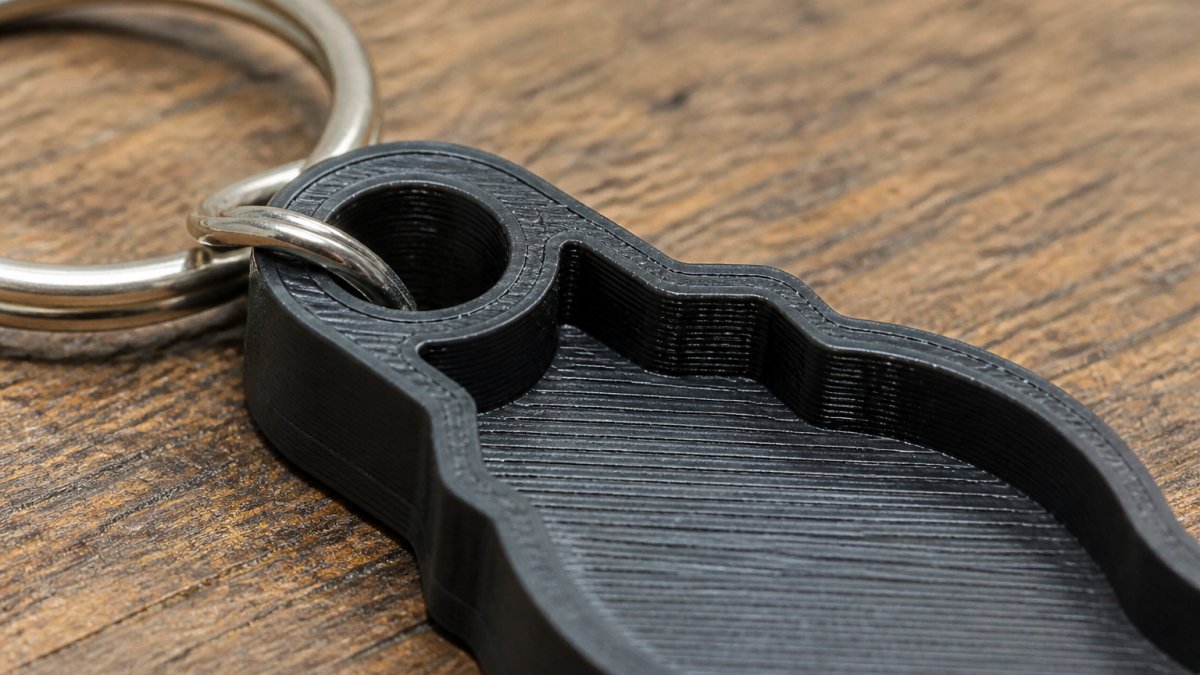
Design and Attachment Hole Reinforcement
The attachment hole is the failure point, where the metal ring clips and stress concentrates. Make it weak and the keychain breaks there within weeks.
Reinforce the attachment hole by:
- Thickening the area around the hole. Add extra material in a radius around where the ring connects. This spreads stress across a wider area instead of concentrating it at a single point.
- Using a larger hole diameter. A hole that's too small creates sharp stress corners. A slightly larger hole with rounded edges lets the metal ring move without tearing the plastic.
- Adding a reinforcement collar. Print a thicker ring or collar around the attachment area. Think of it as internal bracing.
Print Settings That Improve Durability
Your printer settings directly affect how strong the final keychain is. Settings that matter:
- Wall thickness (perimeters). Aim for at least 2-3 mm of outer wall. Thin walls (under 1.5 mm) crack easily. Thicker walls absorb impact better.
- Infill percentage. 15-20% infill is usually enough. Higher infill (30%+) adds weight without much extra strength for small keychains. Too low (under 10%) and the walls collapse under stress.
- Nozzle temperature. Higher temperatures create better layer adhesion. For PETG, print at 235-245°C. For PLA, 200-210°C. Poor adhesion means layers separate under stress.
Orienting your model matters too. Print the attachment hole vertically (not horizontally). This aligns layers perpendicular to the pulling force, making them resist separation better.
3D-Printed Keychain Lifespan: What to Expect
Lifespan is the product of material, geometry, print quality and environment. Two keychains from the same spool can differ by a year or more depending on where they're carried and stored.
Realistic ranges by material
With a reinforced attachment hole and sound print settings, most makers report the following under genuine daily carry:
- PLA: roughly 2 to 6 months before stress whitening or cracking appears at the attachment point, often sooner in hot conditions.
- PETG: roughly 6 months to 2 years, with deformation rather than sudden snapping as the typical end state.
- ABS: broadly similar to PETG for impact, but layer-line cracking is a risk if printed without an enclosure.
Treat these as planning figures, not guarantees. The inspection habit matters more than the estimate.
How heat actually affects prints
Thermoplastics soften near their glass transition temperature. PLA softens at a relatively low temperature, so a keychain left on a dashboard or in a hot glovebox can sag without ever breaking. PETG and ABS tolerate more heat, but no common filament is immune to a closed car in direct sun. Deformation at the attachment hole is the usual first sign, and a deformed hole quickly becomes a cracked hole.
Practical steps:
- Do not store keys on a dashboard, window ledge or anywhere in direct sun.
- Prefer PETG or ABS for keychains that live in a car or on a bag that sits in the sun.
- If a print does soften and sag, reprint rather than bending it back; the material has already been weakened at that point.
UV and moisture over time
Sunlight breaks down most plastics cumulatively: colours fade, then the surface turns chalky and brittle. Moisture matters mainly for prints with poor layer adhesion, where water sits in surface gaps and widens them when it freezes. Keeping the keychain in a pocket or bag is the simplest defence.
What shortens and extends life
Shortening factors:
- A thin or sharp-edged attachment hole.
- Layers running parallel to the pull direction.
- Fast printing and cool nozzle temperatures that weaken layer bonds.
Extending factors:
- A filleted, reinforced attachment hole and a generous wall count.
- Printing the loop so layers cross the pull direction.
- PETG or ABS for anything that leaves the house.
Repair versus reprint
Cyanoacrylate can slow a small crack, but glue doesn't restore the load path, so a repaired loop shouldn't carry a heavy key set. Reprint instead with a thicker collar, a larger fillet and a slower print, and keep your model file so a replacement is one print away.
Pros and Cons of 3D-Printed Keychains for Daily Carry
Advantages
Customisation. Print any design, shape, or colour, with names, pet faces, or characters. Mass-produced keychains can't compete.
Affordability. Material costs are low, so 3D printing is cheap even with printer amortisation.
Repairability. If it breaks, reprint it and try a different design next time.
Unique gifts. Personalised keychains feel thoughtful and bespoke.
Lightweight. They weigh almost nothing and won't bulk up your keys or bag.
Limitations
Not indestructible. It will eventually crack or wear out.
Requires design knowledge. You need a 3D model, so learn CAD or find pre-made designs online.
Print time. A keychain takes 1-4 hours depending on size and complexity.
Printer dependency. Quality depends on calibration; a poorly tuned printer produces weak keychains.
Aesthetic trade-offs. Layer lines and print artifacts make them look handmade, which some love and others don't.
Real-World Durability: What Happens Under Daily Mechanical Stress
Knowing PETG is tougher than PLA isn't useful when you're deciding between two spools. What matters is how a keychain actually fails under real loads. Below is a home testing approach plus the failure modes to look for.
The four loads a keychain actually sees
Daily carry is four stresses attacking different parts of the print.
- Drop impact. A sudden point load on the lowest corner and attachment loop. Brittle PLA chips or snaps; PETG and ABS deform and recover.
- Tensile pull at the ring. Lifting keys by the fob pulls the attachment hole with the key set's weight plus acceleration. A heavy bunch plus a sharp yank is the most common cause of breakage.
- Flex and fatigue. Keys swinging in a pocket bend the keychain thousands of times, so layer adhesion matters more than bulk strength.
A repeatable home durability test
Print the same model in two materials or orientations, run the same sequence on both, and record what happens.
- Drop test. Drop each from waist height onto tiles or concrete ten times, landing on the attachment end. Note chips, cracks or whitening.
- Pull test. Hang a known weight from the ring and lift slowly. A typical key set is well under 1 kg; test at 2 kg and 5 kg and record the load at which the loop deforms or cracks.
- Flex test. Bend through a modest angle 50 times, then inspect the attachment area for stress whitening.
- Abrasion check. Rub the loop against a brick or paving stone 20 times and look for material loss.
Run the same sequence on a PLA print, a PETG print and, if you have an enclosed printer, an ABS print. The pattern most makers report is consistent: PLA shows whitening and cracking first at the attachment hole, PETG deforms but usually survives, and ABS resists impact best but can crack at layer lines if printed too cool.
Where keychains actually break
Across the failure reports makers share, breakage clusters in three places:
- The attachment hole rim. Stress concentrates at the inner edge of the hole. A sharp-edged hole acts like a notch and starts a crack. Rounded, filleted edges spread the load.
- The layer line running across the loop. If the loop is printed so that layers run parallel to the pull direction, the loop can delaminate cleanly. Rotating the model so layers cross the pull direction forces the load through the plastic rather than between layers.
- Thin decorative features. Ears, limbs and thin text are cosmetic but become crack starters when they meet the body of the keychain at a sharp internal corner.
Reading the wear timeline correctly
A month-by-month timeline implies a fixed lifespan, but a keychain fails when a specific load exceeds what a specific weak point can take. A PETG keychain with a filleted, reinforced hole may outlast an ABS one with a sharp-edged hole, because geometry beats material at the failure point. Judge your own by inspecting the attachment area monthly for whitening, deformation or cracks, not by counting months.
Polymer fatigue and cyclic stress research in consumer products
Frequently Asked Questions
How long do 3D-printed keychains last with daily use?
A well-designed 3D-printed keychain made from PETG or ABS typically lasts 1-3 years with daily carry. PLA keychains tend to last 6-18 months before showing significant wear. Lifespan depends on how the keychain is used, light fidgeting and key-ring duty extend life, while frequent dropping or intense mechanical stress shortens it. Proper design, including reinforced attachment holes and thicker walls, adds years to durability.
What is the best filament for 3D-printed keychains?
PETG and ABS are superior to PLA for keychains because they resist impact and repeated flexing better. PETG offers excellent balance: it's tough, relatively easy to print, and handles daily mechanical stress well. ABS is even more durable but requires higher print temperatures and more careful post-processing. PLA is affordable and beginner-friendly but becomes brittle over time, especially when exposed to heat or UV light. For fidget keychains with moving joints, flexible materials like TPU add durability without sacrificing function.
How can I make a 3D-printed keychain stronger?
Reinforce keychains by increasing wall thickness to 2-3 mm, using 100% infill or at least 80% for high-stress areas, and orienting the print so layer lines run perpendicular to the direction of pull. Thicken the attachment hole area with a reinforced loop or ring, avoiding sharp corners that concentrate stress. Choose PETG or ABS instead of PLA, and use slower print speeds (30-40 mm/s) to improve layer adhesion. Post-processing with acetone vapor (for ABS) or annealing (gentle heating) increases strength further.
Are 3D-printed keychains fragile?
Not necessarily. While 3D-printed objects are weaker than injection-moulded plastic, well-designed keychains from durable filaments like PETG withstand daily use reliably. Fragility depends on material choice, print settings, and design. PLA keychains are more brittle and prone to cracking if dropped hard. PETG and ABS keychains flex and absorb impact better. The attachment hole is the most vulnerable point, poor design there causes failure. Quality 3D-printed keychains from Wiggle N Click Prints are built to handle keys, zippers, and backpack carry without breaking.